

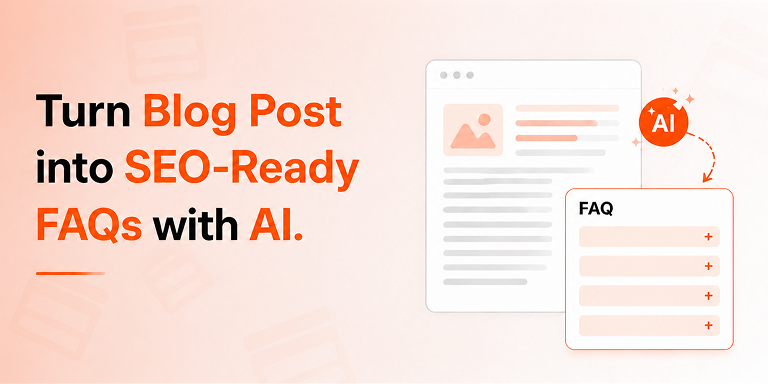
An AI FAQ generator turns any existing blog post or product page into an SEO-ready FAQ section in under five minutes. You simply select your content source, let AI draft the questions and answers, and publish with automatic FAQ schema markup — no coding and no manual writing required.
Sounds too good to be true? It isn’t. In fact, this workflow is quickly becoming one of the smartest SEO moves of 2026. Search has changed: more than 60% of Google searches now end without a single click, because users get their answers directly from AI Overviews, Featured Snippets, and chatbots like ChatGPT and Gemini. As a result, the websites that win are the ones that structure their content as clear questions and answers — exactly what FAQ sections do.
In this guide, you’ll learn how to convert the content you already have into high-performing FAQ sections with AI, step by step. Moreover, we’ll cover the SEO, AEO, and GEO benefits, the best practices, and the common mistakes to avoid. Let’s dive in.
What Is an AI FAQ Generator?
An AI FAQ generator is a tool that automatically creates frequently asked questions and answers from your existing content using artificial intelligence models like Google Gemini or ChatGPT. Instead of brainstorming questions manually, you feed the AI a page, post, or product, and it produces a complete, ready-to-publish FAQ section.
Modern WordPress FAQ plugins, such as Easy Accordion, build this feature directly into the block editor. Consequently, you never leave your WordPress dashboard. You pick a content source, choose a writing tone and language, and generate accurate FAQs in seconds.
Here’s what a good AI FAQ generator should offer:
Why Turn Blog Posts and Product Pages into FAQ Sections?
Turning existing content into FAQ sections boosts search visibility, wins AI citations, and answers customer objections at the exact moment of decision. In other words, one repurposing workflow serves SEO, AEO (Answer Engine Optimization), and GEO (Generative Engine Optimization) at the same time.
Let’s break down each benefit.
FAQ Sections Feed Google’s Answer Features
Google pulls question-and-answer content into People Also Ask boxes, Featured Snippets, and AI Overviews. Therefore, a well-structured FAQ section gives your page multiple chances to appear at the top of the results — even above the traditional #1 ranking.
AI Engines Quote Question-Based Content
ChatGPT, Perplexity, Gemini, and Claude synthesize answers from sources they can easily parse. Short, direct answers under question-based headings are the easiest format for these systems to extract and cite. As a result, FAQ sections have become a core GEO tactic: they make your brand quotable in AI-generated answers, not just visible in blue links.
Product Page FAQs Increase Conversions
Shoppers abandon carts when questions go unanswered. Shipping times, sizing, compatibility, return policies — every unanswered doubt costs you a sale. However, a product FAQ tab answers those objections instantly, which reduces support tickets and lifts conversion rates simultaneously.
You Already Own the Raw Material
This is the best part. You don’t need new content; you need a new format. Your blog posts already explain topics in depth, and your product pages already describe features and benefits. An AI FAQ generator simply restructures that knowledge into the question-answer format that modern search rewards.
How to Turn a Blog Post or Product Page into an FAQ Section with AI
To convert any post or page into an SEO-ready FAQ section, install a WordPress FAQ plugin with AI generation, connect a free Gemini API key, select your content source, generate the FAQs, review the answers, and publish with schema markup enabled. The whole process takes about five minutes.
Here’s the detailed walkthrough using Easy Accordion, which includes AI FAQ generator powered by Google Gemini.
Step 1: Install the Plugin
First, go to Plugins → Add New in your WordPress dashboard.
Then, search for “Easy Accordion,” install it, and activate it.
Easy Accordion includes the AI FAQ generator, 12+ Gutenberg blocks, and automatic FAQ schema support.
Step 2: Connect a Free AI API Key
Next, open the plugin’s Integrations panel and connect Google Gemini.
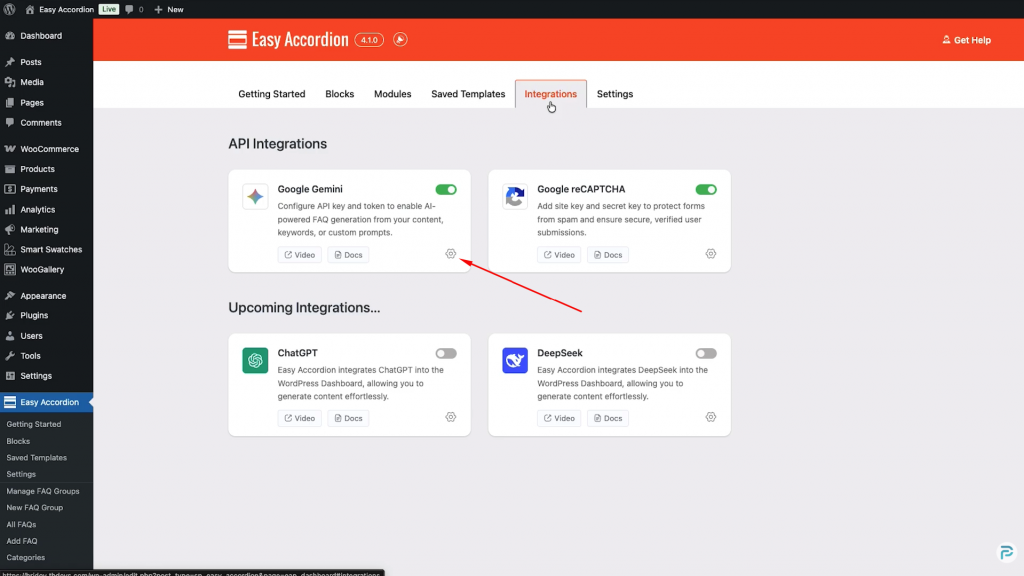
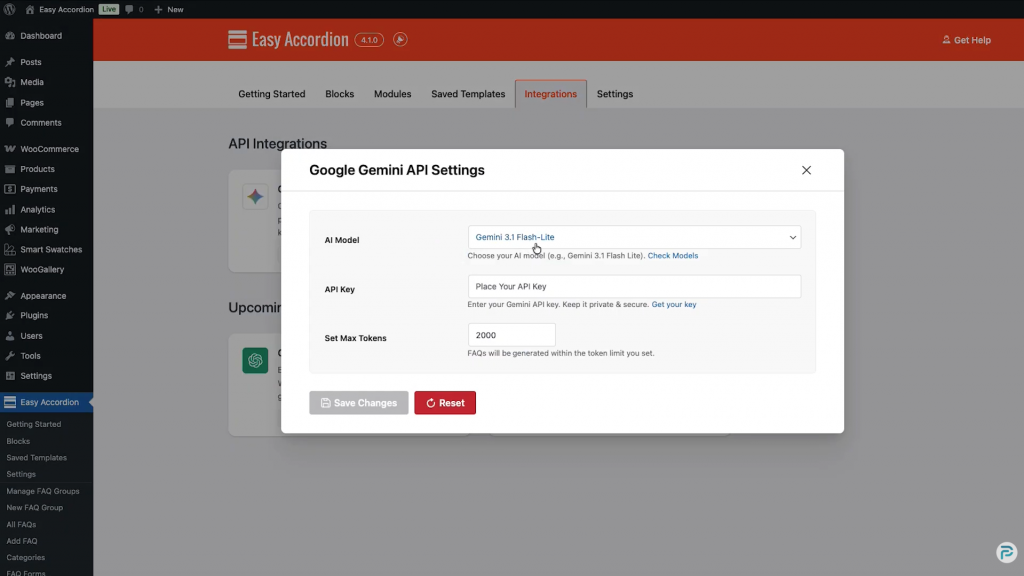
You can grab a free API key from Google AI Studio in under a minute.
Paste it in, save, and the AI generator becomes active across all your accordion blocks.
Prefer ChatGPT or DeepSeek? The Pro version supports those models as well.
Step 3: Add an FAQ Block to Your Page
Now, open the post or page where you want the FAQ section. Insert the Vertical Accordion (FAQ) block from the block library.
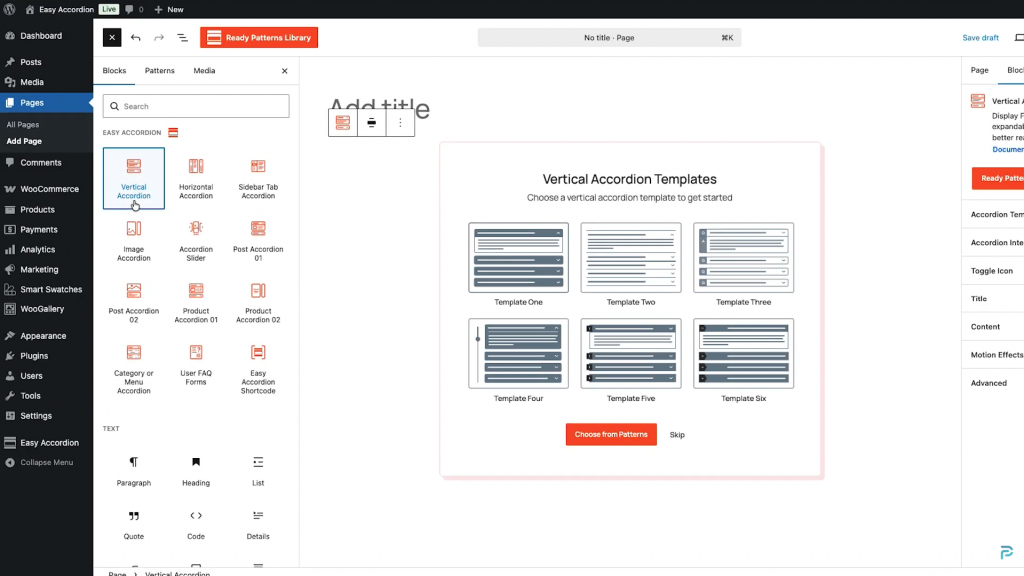
Alternatively, use the shortcode or the Elementor widget if you build pages outside Gutenberg.
Step 4: Select Your Content Source
Click Generate FAQs with AI. This is where the magic happens: instead of typing a prompt from scratch, choose a content source — Pages, Posts, or Products — and pick the exact item you want to repurpose.
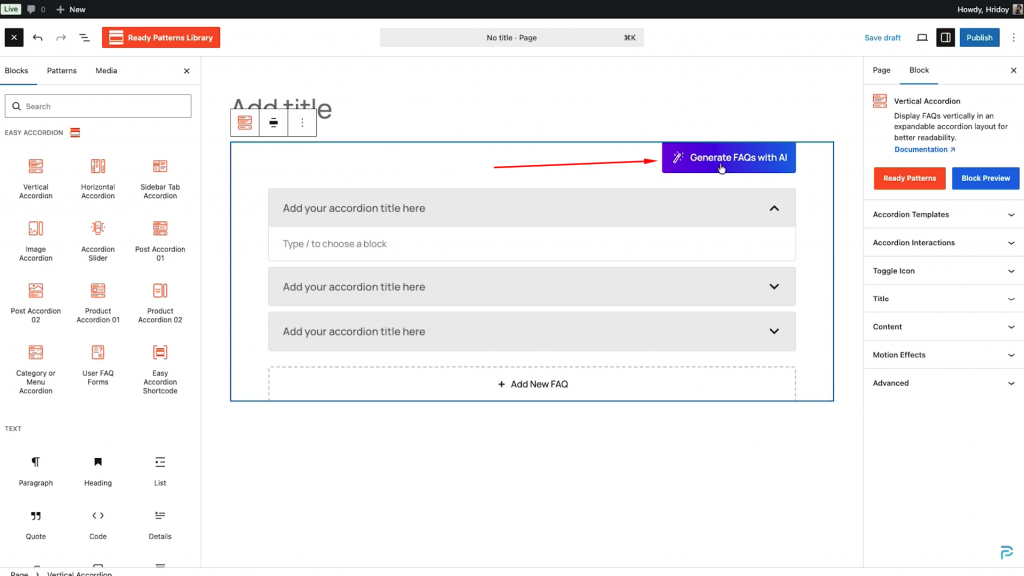
The AI then reads that content and bases every question and answer on it. Consequently, the output stays factually grounded in what you actually published.
Step 5: Choose Tone, Language, and Question Count
After that, fine-tune the output. Select a writing tone (professional, friendly, conversational, technical, beginner-friendly, and more) and an output language — 17 languages are supported, from English and Spanish to Bengali, Arabic, and Japanese.
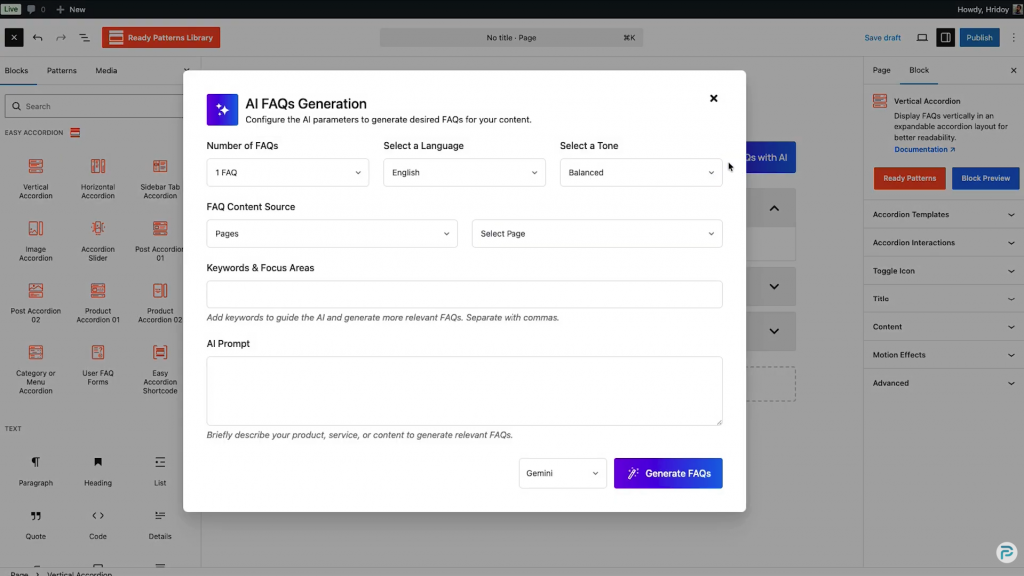
Additionally, set how many FAQs you want. For most pages, 5–8 questions hit the sweet spot.
Step 6: Review and Edit the Generated FAQs
AI drafts fast; humans make it trustworthy. Therefore, always review each answer before publishing. Trim answers to roughly 40–60 words, because concise answers are what search engines and AI models quote most often.
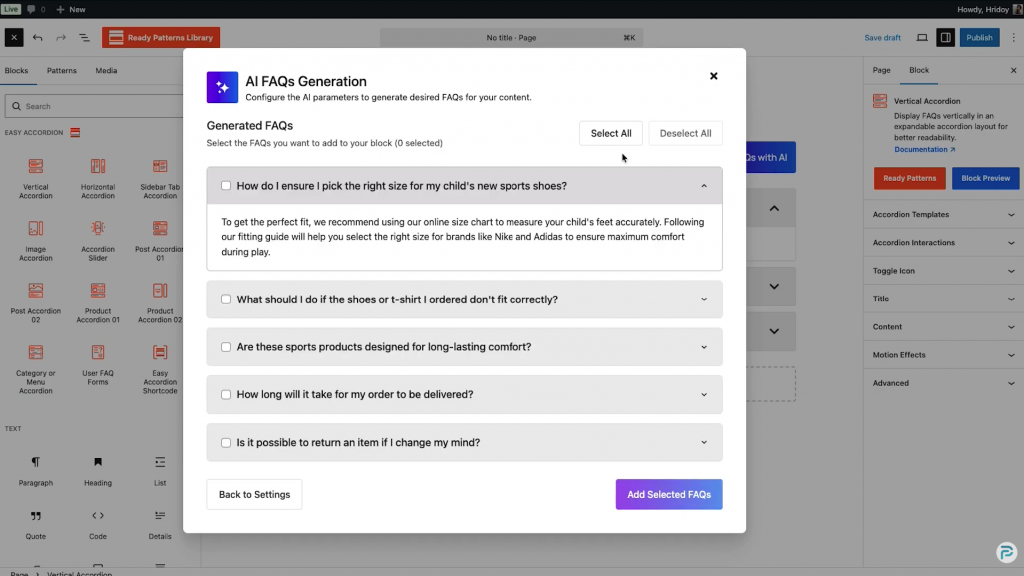
Furthermore, reorder questions with drag-and-drop so the most important ones appear first.
Step 7: Publish with FAQ Schema Enabled
Finally, make sure FAQ schema markup is switched on. The plugin automatically outputs JSON-LD structured data (FAQPage, Question, Answer), which tells Google and AI crawlers exactly what each question and answer is.
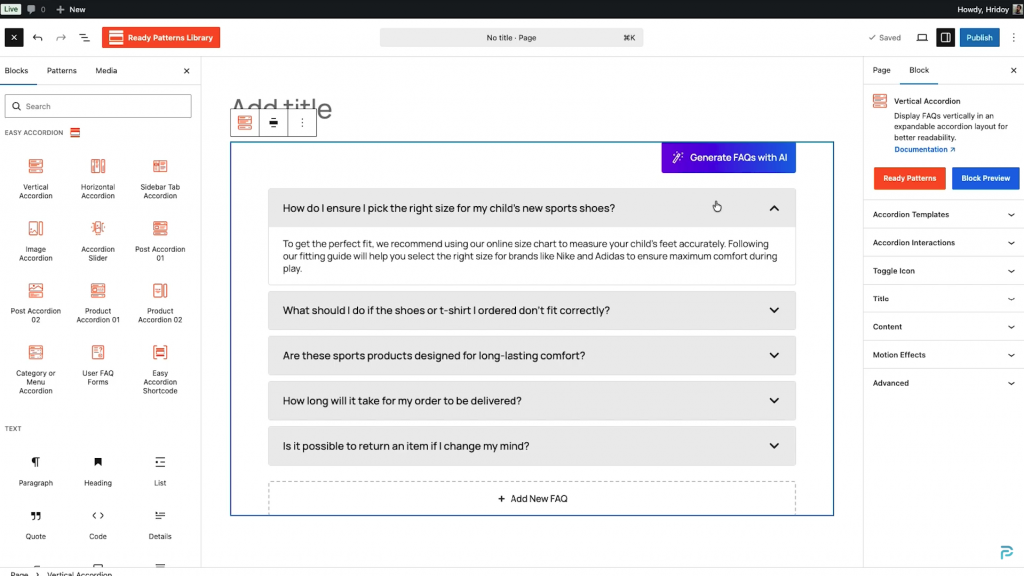
Hit publish — your FAQ section is now live, structured, and machine-readable.
What Is FAQ Schema Markup and Why Does It Matter?
FAQ schema markup is structured data in JSON-LD format that labels your questions and answers so search engines and AI systems can read them without guessing. It’s the difference between content machines might understand and content machines definitely understand.
Without schema, Google has to infer your page structure. With schema, however, every question and answer carries an explicit label. That clarity increases your eligibility for rich results, People Also Ask placements, and citations inside AI-generated answers. In short, schema is the native language of answer engines — and a quality FAQ plugin writes it for you automatically.
Best Practices for AI-Generated FAQ Sections
AI gives you speed; strategy gives you results. Follow these rules to get both:
Common Mistakes to Avoid
Even with AI, a few missteps can undo your work. Avoid these:
Frequently Asked Questions
Can AI really write accurate FAQs from my content?
Yes — when the AI reads your actual page as its source. Content-sourced generation grounds every answer in what you published, which dramatically reduces errors. Nevertheless, always review the output before publishing, because you remain responsible for accuracy.
Is the AI FAQ generator available in Easy Accordion?
Yes. Easy Accordion includes AI FAQ generation powered by Google Gemini, and Google AI Studio offers a free API tier. The Pro version adds more AI models, such as ChatGPT and DeepSeek, along with advanced layouts and analytics.
Does FAQ schema still help SEO in 2026?
Absolutely. Although Google limited FAQ rich snippets to authoritative sites in 2023, FAQ schema still feeds People Also Ask, AI Overviews, and AI chatbots. Structured data helps machines understand your content — and machine understanding is what AI-era visibility depends on.
How many FAQs should I add to a page?
Five to eight focused questions work best for most pages. That range covers the main user doubts without diluting the page’s topic. For complex products or pillar guides, you can extend to ten or twelve.
Do accordions hide content from Google?
No. Google fully indexes content inside collapsed accordions on mobile-first indexing. Moreover, accordions improve user experience by reducing scroll depth, which supports engagement signals.
Can I generate FAQs in languages other than English?
Yes. Modern AI FAQ generators support multilingual output — Easy Accordion, for example, generates FAQs in 17 languages, including Spanish, French, German, Hindi, Bengali, Arabic, Chinese, and Japanese.
Your Old Content Is Your Next Ranking Asset
The search landscape rewards answers, not just articles. Fortunately, you don’t need to write anything new to compete. Every blog post and product page you’ve already published contains dozens of potential questions and answers — and an AI FAQ generator extracts them in minutes.
So here’s your action plan: pick your five highest-traffic pages, generate a focused FAQ section for each with AI, enable schema markup, and review the answers by hand. Then watch those pages start appearing in People Also Ask boxes, AI Overviews, and chatbot citations.
Ready to try it? Install Easy Accordion, connect your AI API key, and turn your first blog post into an SEO-ready FAQ section today.


Leave a Reply
You must be logged in to post a comment.