

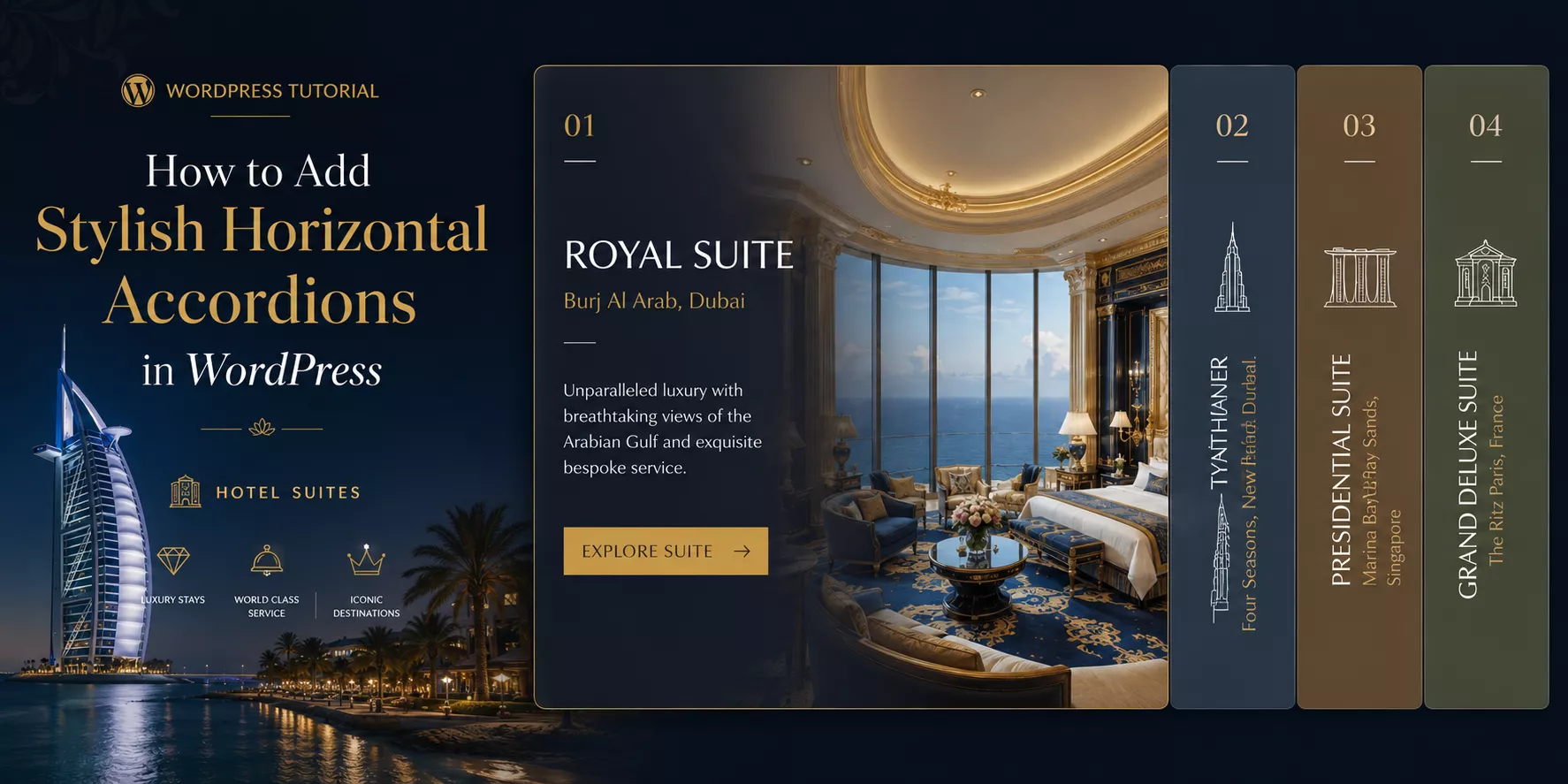
In this blog, I’ll show you the easiest method to add stylish horizontal accordions in WordPress in minutes. No code or complex prompt is needed.
Most WordPress users know accordions. But horizontal accordions? That is a different story.
A vertical accordion stacks content top to bottom. A horizontal accordion expands content side by side. It is a subtle difference that creates a dramatically different user experience.
This guide covers everything you need to know. You will learn what horizontal accordions are, the best use cases, the easiest way to build them in WordPress, and actionable design tips to make yours stand out.
TL;DR / Key Takeaways
- Horizontal accordions expand content side by side, not top to bottom.
- Horizontal accordions work best for visual story telling, booking steps, featured news/article/project/portfolio showcase, events showcase, speakers & performers showcase, etc. Want to learn more? read the details below.
- Easy Accordion is the easiest no-code way to add horizontal accordions in WordPress and WooCommerce. Only 3 simple steps– Choose a ready pattern, add your content, customize visually and publish in minutes.
- Good design, perfect contrast, and smooth animations make the biggest difference.
- Avoid overloading panels with text. Keep content concise and scannable.
- Besides Gutenberg, you can create accordions for Elementor, Divi, and all popular page builders with Easy Accordion.
What is a Horizontal Accordion?
A horizontal accordion is an interactive UI element. It displays a row of panels side by side. Each panel expands or collapses when a user clicks or hovers over it.
Think of it like a folder system laid flat. Instead of opening drawers one on top of another, you open them left to right.
Here is a simple breakdown:
- Vertical accordion: panels stack top to bottom (the traditional FAQ layout).
- Horizontal accordion: panels expand left to right (a modern, visual-first layout).
Horizontal accordions can display text, images, icons, or mixed media inside each panel. They are fully interactive and responsive when built with the right tool.
What are Key Use Cases of Horizontal Accordions
Horizontal accordions are not just pretty. They solve real layout problems. Here are the best scenarios to use them.
- Project Showcases
- Portfolio Showcases
- Image Galleries or Visual Storytelling
- Hotel Suite Categories Showcase
- Booking Steps Display
- Sequential Travel Destinations Display
- Event or Schedule Layouts
- Speakers & Performers Showcase
- News, Content, Service, & Product Highlights
- Product Features Showcase
- Team Members Showcase
- Portfolio Display
- Project Display
- Service Showcase
- Step-by-Step Processes Showcase
- Class & Categories Showcase
- Service or Offering Breakdown Showcase
- Product/Service Offerings or Features
- Timelines & Schedules
Best Method to Create Horizontal Accordions in WordPress
There are several ways to add horizontal accordions in WordPress. Let’s look at the key options.
Option 1: Custom CSS and JavaScript with AI (Advanced)
You can build a horizontal accordion from scratch with HTML, CSS, and JS using AI. This gives you full control.
However, it requires prompt engineering skill, coding knowledge to review, ongoing maintenance, and hours of work. A vague prompt or small CSS conflict can break the layout across your entire site.
Not ideal for most WordPress users.
Option 2: Easy Accordion Plugin (Best Method)
Easy Accordion is the most popular and beginner-friendly solution. It is a dedicated WordPress FAQ and accordion plugin trusted by 100,000+ WordPress sites.
It includes multiple Horizontal Accordion blocks and thoughtfully designed patterns by UX/ UI professionals.
Plus, it’s fully compatible with Elementor, Divi, WP Bakery, and all major page builders.
Here is why Easy Accordion stands out for horizontal accordions:
- Rich pattern library to import, customize, and publish in minutes
- No coding required to configure or style
- Visual customizer to control colors, dimensions, icons, and animations
- No matter your editor or builder, works for all
- Responsive design with custom breakpoints for every device
- Auto layout switch from horizontal to vertical on mobile (Pro)
- Works with WooCommerce for product-focused horizontal displays
- Accordion Slider for more content.
- Supports content types text, images, videos, product, and custom posts.
Easy Accordion holds a 4.9-star rating and has been trusted by WordPress users since 2015. It is the most reliable choice for building horizontal accordions without touching code.
Let’s Install Easy Accordion and choose ready patterns from a rich library to add stunning horizontal accordion effortlessly.
3 Simple Steps to Add a Horizontal Accordion
After installing the best wordpress accordion plugin, follow the 3 easy steps below to add an outstanding horizontal accordion in WordPress block editor.
Step 1: Choose a Ready Horizontal Accordion Pattern
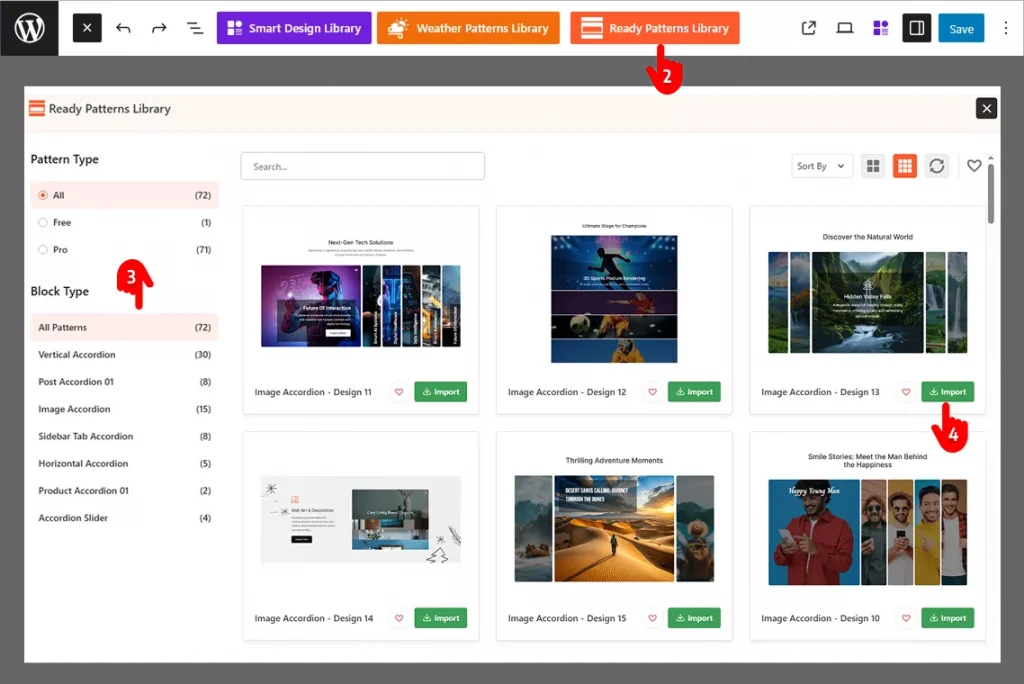
- Go to the page or post where you want to add the accordion.
- Click the Easy Accordion Library icon at the top of block editor.
- Find a horizontal accordion pattern that fits your needs.
- Click Import and it drops straight into your page.
Step 2: Add Your Image & Content
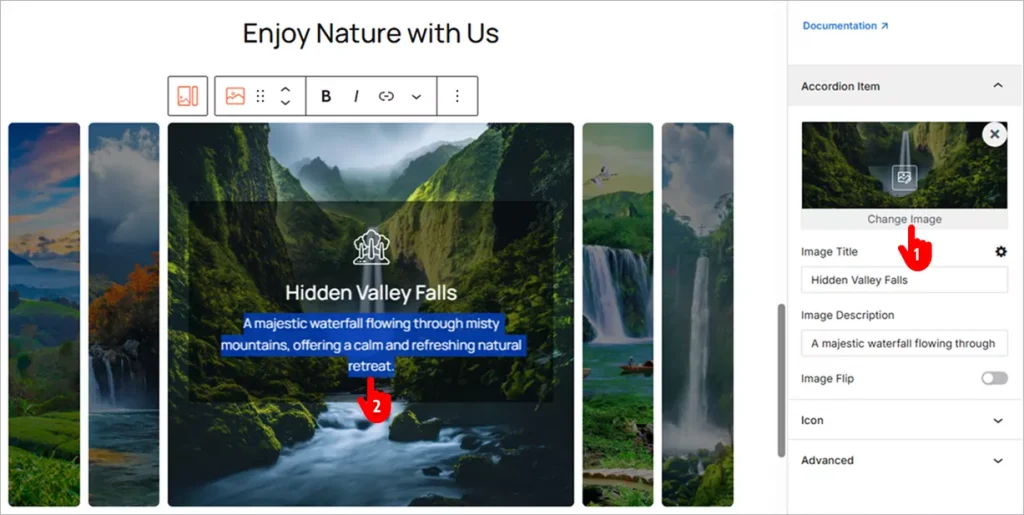
- Click “Change Image” in the right-side panel to upload your own image.
- Add your content just like you would in a Google Doc.
Step 3: Customize Visually and Publish Your Accordion
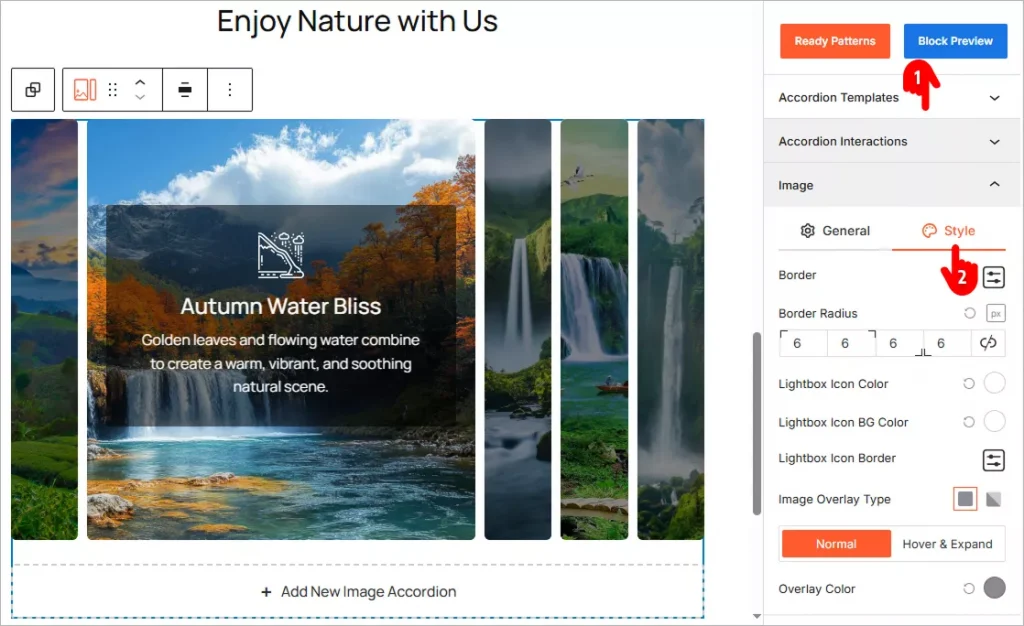
- Browse through the panels and explore all available features. Apply them based on your needs.
- Most panels include a Style tab. Use it to customize your Horizontal Accordion and match your brand’s look and feel.
- When you’re happy with your changes, click the Publish or Save button in the top-right corner.
Design Tips to Make Your Horizontal Accordions Stand Out
A horizontal accordion is only as good as its design. Follow these tips to create one that looks professional and performs well.
Use Strong Visual Contrast Between Panels
Each collapsed panel should look distinct from its neighbors. Use alternating background colors or clear border lines. Strong contrast helps users understand where one panel ends and another begins.
Keep Panel Labels Short and Descriptive
The collapsed state shows only the visual and panel label. Make it count. Use action words or clear topics. For example, use “Step 1: Plan” instead of “Planning Phase Overview.” Short labels scan faster and invite clicks.
What to do if your titles are not short anyway? use vertical orientation for the titles in collapsed mode.
Add Hover Animations for Interactivity Cues
Users need to know a panel is clickable. A subtle hover effect, like a color shift or slight scale, signals interactivity. Easy Accordion includes animation options you can enable without writing CSS.
Balance Panel Width with Content Length
Each panel should hold a manageable amount of content. If one panel has 500 words and another has 20, the layout feels off. Aim for roughly equal content depth across all panels.
Use High-Quality Images Inside Panels
For image-heavy accordions like portfolios or product showcases, image quality matters more than anywhere else. Blurry or low-resolution images kill credibility. Use crisp visuals sized correctly for the expanded panel width.
Set a Clear Expanded State
The open panel should look noticeably different from the closed ones. Use a stronger background color, bolder title text, or a shadow. Users should always know which panel is active.
Test on Mobile Before Publishing
Horizontal accordions can become cramped on small screens. Easy Accordion Pro includes an auto layout switch that converts horizontal accordions to vertical on mobile devices. Always preview your accordion on a phone before going live.
Match Your Brand Colors and Fonts
An accordion that clashes with your site design looks out of place. Use your brand color palette and match font choices to your theme. Easy Accordion’s visual editor makes this easy with direct color and typography controls.
Common Mistakes to Avoid
Even great ideas can fall flat with the wrong execution. Here are the most common horizontal accordion mistakes and how to sidestep them.
Mistake 1: Overloading Panels with Text
A horizontal accordion is a visual element. Stuffing each panel with paragraphs of text defeats the purpose. Keep content tight. Use bullet points, short sentences, and visuals instead of long-form copy.
Mistake 2: Using Too Many Panels
More than five or six panels starts to feel cramped on desktop and unusable on mobile. Limit yourself to four or five panels for the cleanest result. Group related content if needed.
Mistake 3: Skipping the Mobile Test
A horizontal layout that looks stunning on a 1440px monitor can break completely on a 375px phone screen. Always test responsiveness before publishing. Use a plugin that handles mobile adaptation automatically.
Mistake 4: Ignoring Load Speed
Animations and large images inside accordion panels can slow your page down. Easy Accordion is optimized for speed and performance. Still, compress your images and keep media file sizes in check.
Mistake 5: No Clear Call to Action Inside Panels
If a panel showcases a product, service, or feature, give the user somewhere to go next. Add a button or link inside the expanded panel. An accordion without a CTA is a missed conversion opportunity.
Mistake 6: Inconsistent Styling Across Panels
Every panel should follow the same visual rules. Mixing fonts, icon styles, or spacing between panels looks unprofessional. Set your styles once in Easy Accordion’s editor and apply them globally.
Mistake 7: Not Using Schema Markup
If your horizontal accordion contains FAQ content, missing schema markup means missing out on Google rich snippets and AI-generated answers. Easy Accordion automatically adds FAQ Schema Markup to help your content appear in search results and AI assistant responses.
Key Benefits of Using Horizontal Accordions
Here are the concrete benefits horizontal accordions deliver.
- Quick Content Scannability: Accordions, including horizontal ones, improve content scannability. Visitors can watch everything at a glance and scan the themes quickly.
- Stronger Visual Impact: A horizontal layout immediately looks different from a standard page. It grabs attention and keeps users engaged longer.
- Better Use of Screen Real Estate: Horizontal layouts use wide screens efficiently. They spread content across the full width instead of leaving whitespace on the sides.
- Improved User Experience: Interactive elements invite exploration. Users who interact with your content spend more time on your page and convert at higher rates.
- Reduced Page Length: Instead of scrolling through long sections, users access all content within one compact horizontal block. Less scrolling means faster decisions.
- Higher Conversion Rate: Horizontal accordions are highly interactive and playful with effects and animations that connect visitors and convert them more.
Final Words
Horizontal accordions are unique, stylish, interactive, and highly converting.
They look better. They work smarter. They convert your visitors.
The easiest way to get started is with Easy Accordion. It includes multiple dedicated Horizontal Accordion blocks and ready patterns, visual customizations, mobile-responsive design, and built-in Schema for SEO & GEO. No code required.
Let’s add a stunning horizontal accordion to your site and grow conversion.


Leave a Reply
You must be logged in to post a comment.