

Are you fed up with your confused visitors, high bounce rates, repetitive customer queries? Do you want to learn how to write FAQs that really increase visibility on search engines and AI, reduce support costs, and grow conversion rates?
In this blog, I’ll share 8 effective strategies to write high-converting FAQs and the best examples.
By the end of this blog, you will be able to write the most impactful FAQs and turn your confused visitors into regular customers.
Let’s get in.
TL;DR/ Key Takeaways
- What is FAQ: A FAQ is a structured list of real customer questions paired with clear, direct answers that build trust and drive action.
- Best Tips to Write High-converting FAQs: Use real customer questions, keep answers short and conversational, optimize for SEO and GEO, and use an accordion layout for better UX.
- Common Mistakes in FAQ Writing: Avoid writing assumed questions, burying answers, skipping schema markup, and leaving your FAQ section without a next step or CTA.
- Explore Ready FAQ Template Library: Get a rich FAQ template library. Choose a pattern, customize visually, and publish in minutes.
What is FAQ?
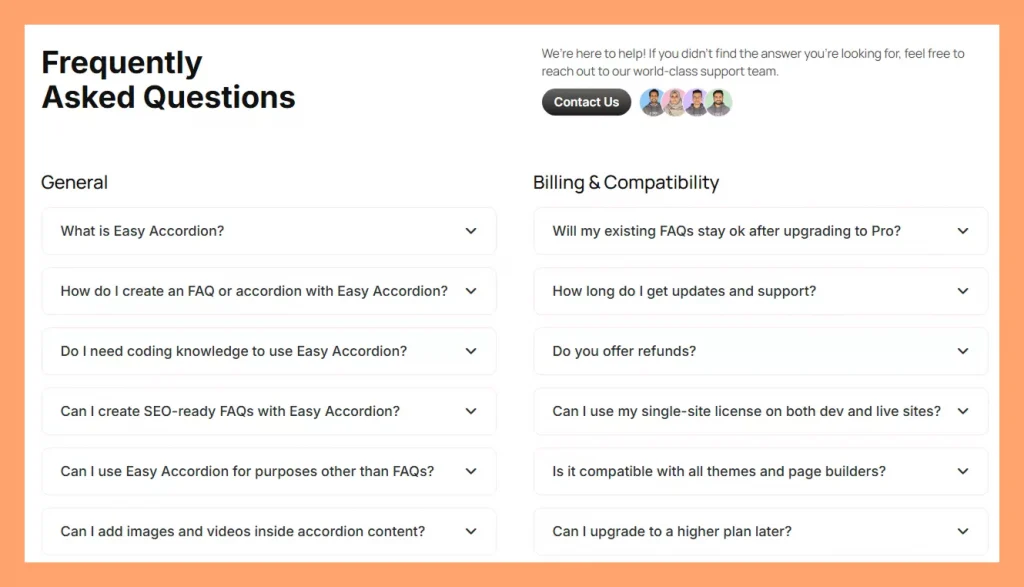
FAQ stands for “Frequently Asked Questions”. It’s a structured list of real customer questions paired with clear, helpful answers.
- Real questions — phrased the way your customer would type or speak it
- Direct answers — leading with the most important information
- Supporting detail — a short explanation, stat, or example that builds confidence
- Accordion Layout — Expand & collapse layout to make FAQs scannable & interactive.
- A next step — a subtle CTA, link, or reassurance that moves the reader forward
Why FAQs are So Important
FAQs are one of the most underrated assets on any WordPress or WooCommerce site. Here is why they deserve serious attention.
Increase Visibility on AI (GEO Advantage)
AI tools like Claude, ChatGPT, Gemini, and Google’s AI Overviews favor structured question-and-answer content. When your FAQs include schema markup, these tools cite your site in AI-generated responses and put your content in front of users who never type a traditional search query.
Win featured snippets and “People Also Ask” spots (SEO advantage)
Google pulls FAQ content into featured snippets and “People Also Ask” boxes, which sit above regular organic results. With proper schema markup, your site can appear twice on the same results page and capture high-intent shoppers right at the moment they are closest to buying.
Reduce Confusion
Confused visitors do not buy. They simply leave. A clear FAQ removes the friction between “I’m interested” and “I’m buying.” It answers doubts before they turn into objections. It also fills the gaps your product page might miss.
Grow Conversion
Addressing buyer questions at the point of decision increases conversion rates. Product page FAQs, in particular, reduce cart abandonment by eliminating unanswered doubts right before checkout. That directly impacts your WooCommerce revenue.
Cut Support Cost
Every question your FAQ answers is a support ticket you never receive. For WooCommerce stores with high order volumes, this adds up quickly. A strong FAQ can reduce repetitive support queries by 30 to 50 percent.
Improve On-Page Engagement Signals
When visitors find answers on your page, they stay longer. They scroll further and click more. These engagement signals tell search engines your content is valuable, which then improves your rankings over time.
Where You Actually Need an FAQ Section
Not every page needs a FAQ. But these locations almost always benefit from one:
Homepage — Address the top general queries you have collected.
Product pages — Answer shipping, compatibility, returns, and feature questions
Pricing page — Eliminate hesitation around billing, plans, and refunds
Landing pages — Handle objections right before the CTA
Support/contact page — Deflect common queries before users submit tickets
Blog posts — Add topical FAQs to capture “People Also Ask” traffic
Documentation — Answer setup and usage questions inline
If a page needs to address users’ concern and a conversion goal, a FAQ belongs on it.
8 Best Practices for Writing FAQs That Convert
1. Collect Real Customer Questions
The biggest FAQ mistake is writing questions you think people ask. Instead, collect questions people actually ask.
Start with these sources:
- Your Support Inbox
- Sales call notes
- Product Page Comments
- Product Reviews
- Socials and Communities
- Heatmaps: Microsoft Clarity/ Hotjar
Prioritize questions that appear more than once. Those are your most important FAQ items.
What to Do If You Have No Question List Yet?
If you are fresher in the market or you have no question in your channels, what to do?
It’s a common scenario that most of the customers leave your sites with questions in their mind. They are too busy to ask you the question. Finally, you are losing customers.
What to do? In this cases, check:
- Your competitors’ FAQs
- Your competitors’ product reviews
- tools like AnswerThePublic or Reddit
- Google’s “People Also Ask” box
- Keyword Research
- Ask multiple AIs
Pro Tip: If your service or product is completely new in the market, customers must have more questions. You yourself have to research and ideate a question list initially.
2. Keep Answers Short and Scannable
Nobody reads FAQ answers like a novel. Visitors scan, search, and want the answer fast. So your answer structure should follow a simple three-part pattern.
Lead with the direct answer in the very first sentence. No preamble, no “great question.” Add one supporting sentence if needed for clarity. Then close with a link or CTA if any action is required.
Here is a bad example: “That’s a great question! Our plugin is compatible with most themes, but it really depends on the theme you’re using and how it’s coded. If your theme follows WordPress coding standards, you should be fine, but there might be some issues with custom CSS.”
Here is a good example: “Yes. Easy Accordion works with all standard WordPress themes, including Astra, Avada, and OceanWP. Test on a staging site first if your theme uses heavy custom CSS.”
Short answers also display far better inside accordion layouts, which we cover in practice number seven.
3. Use Natural, Conversational Language
Write FAQs the way your customer talks, not the way a legal document reads.
Use “you” and “we” instead of “the user” or “the company.” Avoid jargon unless your audience is technical, and even then define it once. Match the vocabulary your customer actually uses. If they say “plugin,” do not say “extension.” And finally, read your answer out loud. If it sounds robotic, rewrite it.
For WooCommerce stores, this is especially important. Shoppers make emotional decisions, so warm and human language builds trust faster than corporate copy.
4. Optimize Your FAQ for SEO and GEO (FAQ Schema)
A well-structured FAQ does double duty: it helps visitors AND search engines.
For SEO:
- Include your target keyword naturally in the question
- Use H2 or H3 tags for questions (not just bold text)
- Add FAQ schema markup — structured data that tells Google your content is a FAQ
For GEO (AI search visibility):
- Write answers that are complete on their own — AI engines pull self-contained answers
- Aim for 40–60 word answers for complex questions — long enough to be useful, short enough to extract
- Structure answers as “yes/no + explanation” when possible — AI models prefer direct starts
- Use FAQ schema– AI bots love structured data.
Tools like Easy Accordion add FAQ schema markup automatically. This means your FAQs become eligible for Google rich snippets and AI answer features without any technical setup.
5. Add Search and Filters for a Lot of Questions
If you have more than 10 FAQ items, navigation becomes a problem. Visitors do not scroll through 30 questions to find the one they need.
The solution: add search and filtering.
- FAQ search lets users type a keyword and see matching answers instantly
- Category filters let users browse by topic (Shipping, Returns, Compatibility, etc.)
For WooCommerce stores, this is especially valuable. A product with 20+ FAQs becomes unusable without filters. With them, it becomes a powerful self-service tool.
Easy Accordion’s Pro version includes AJAX live search and smart frontend filters — so visitors find answers in seconds, not minutes.
6. Add an FAQ Form or Support Link Below Your FAQs
Even the best FAQ misses some questions. So always give visitors a path forward.
Two options work well:
Option A: FAQ submission form — Let visitors submit questions they cannot find answers to. This also builds your FAQ over time. Easy Accordion includes a User FAQ Form block for exactly this purpose.
Option B: Support link or CTA — A simple “Still have questions? [Contact us]” line at the bottom of your FAQ section catches anyone who did not find their answer.
Never leave a FAQ section as a dead end. Always offer the next step.
7. Use the Accordion Layout for Your FAQ
A plain list of questions and answers is hard to read. Everything is visible at once. It is visually noisy and visitors struggle to find what they need.
The accordion layout solves this neatly. Each question is a collapsed row. Visitors click to expand only what they need. The result is a cleaner UI with less visual clutter, faster scanning since users find the question before reading the answer, a better mobile experience, and stronger engagement because interactive elements keep users on the page longer.
For WordPress and WooCommerce, Easy Accordion is the go-to plugin for this. It offers 15+ accordion block types — including vertical, horizontal, image, post, and product accordions — with full Gutenberg, Elementor, and classic editor support.
You can set it up in three steps: pick a template, add your content (or generate it with AI), and publish.
8. Watch Analytics and Update Your FAQs Regularly
FAQs are not a “set it and forget it” asset. Customer questions change. Products evolve. New objections emerge.
Track a few key signals regularly. Check your support ticket volume to see if the same questions still come in after publishing your FAQ. Review your FAQ analytics every week. If you are a WordPress user, Easy Accordion’s built-in FAQ analytics is the best choice for you.
A good rule: review your FAQ every quarter. Add two or three new items. Remove anything outdated. This keeps your content fresh for both users and search engines.
Common FAQ Mistakes That Kill Engagement
Never make these common FAQ mistakes.
- Writing from company perspective, not user perspective: Focuses on what you want to say instead of what users actually need, reducing relevance and clarity.
- Overloading with too many questions: Too many FAQs overwhelm users, making it harder to find quick, helpful answers.
- Outdated or irrelevant info: Old or unnecessary information breaks trust and confuses users.
- No clear next step (missing CTA): Without a clear action, users leave without converting or moving forward.
Ready FAQ Template Library (Plug-and-Play)
Easy Accordion, a WordPress FAQ & accordion plugin, includes a full library of pre-designed, ready-to-use FAQ and accordion templates. You do not need to start from scratch or hire a designer if you are a WordPress user. Even non-WordPress users can get modern, high-impact FAQ design ideas.
Final Words
A great FAQ does more than answer questions. It builds trust, reduces friction, drives conversions, and improves your visibility in both traditional and AI search.
The difference between a FAQ that helps and one that converts is intention. Use real questions. Write short, direct answers. Add schema markup. Use an accordion layout. Keep it updated.
Start with five strong questions today. Add more as you learn what your customers actually need.
If you are using WordPress or WooCommerce, Easy Accordion makes the whole process faster — from AI-generated content to built-in schema markup to analytics. It powers 100,000+ sites and is rated 4.9 stars for a reason.


Leave a Reply
You must be logged in to post a comment.