

Before you can start building beautiful accordions with Easy Accordion, you need to download the plugin from your ShapedPlugin account.
Whether you’re using the Classic Shortcode Generator or the Gutenberg Accordion Blocks, the process is quick and straightforward.
Steps to Download the Plugin:
- Log in to Your Account
- Access the Dashboard Section
- Check Your License Key Ready
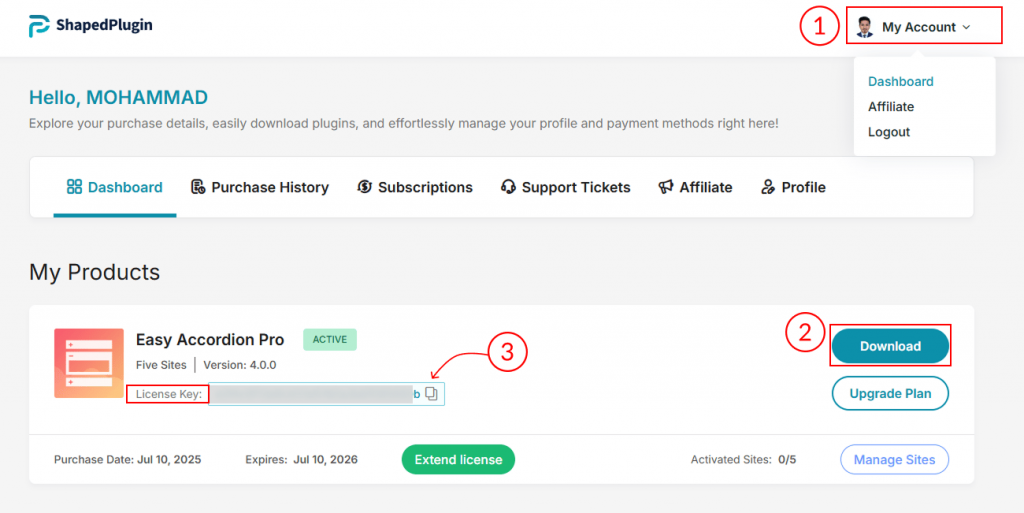
Step 1: Log in to Your Account
- Visit the official ShapedPlugin website.
- Click My Account at the top menu.
- Log in using the email address and password associated with your purchase.
✅ Make sure you use the same account used to purchase Easy Accordion Pro to access your download and license key.
Step 2: Access the Dashboard Section
Once logged in:
- Go to the Dashboard.
- Locate Easy Accordion Pro in your purchase list.
- Click the Download button.
⚠️ Keep the .zip file intact. Do not unzip it before uploading to WordPress.
Step 3: Keep Your License Key Ready
In your account dashboard, you’ll also find your License Key.
You’ll need it to activate the plugin and enable automatic updates. Keeping it handy saves time during installation.
Have more questions? No problem! Feel free to get in touch with our Top Notch Support Team.
Thank you & keep enjoying the plugin!