

After activating Easy Accordion, the menu will appear in your WordPress dashboard.
This menu acts as your central control panel for creating, managing, and customizing all your accordions.
Easy Accordion Menu Overview:
Inside the Easy Accordion menu, you’ll find:
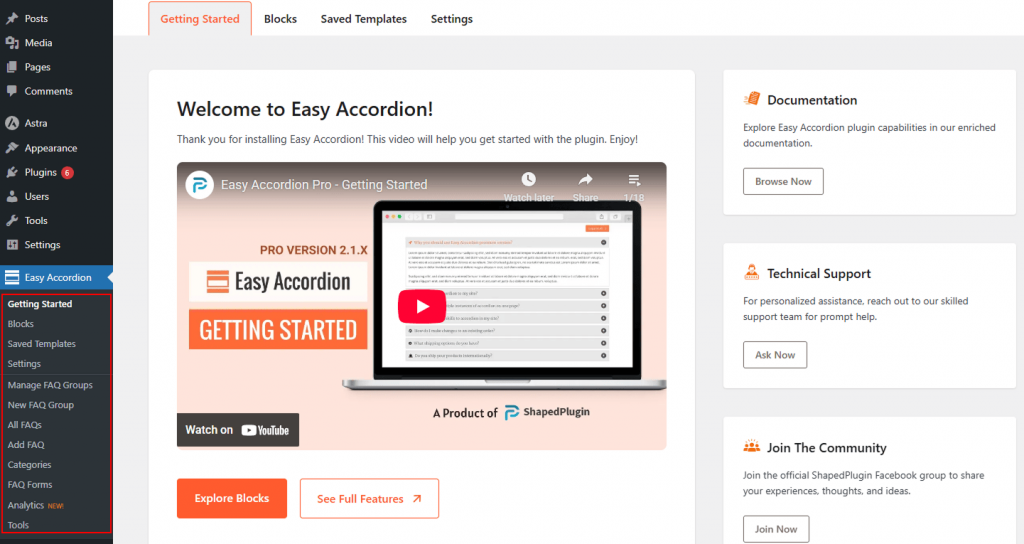
- Getting Started – Access welcome resources, video tutorials, documentation, technical support, community links, and more.
- Blocks – Create and manage Gutenberg Accordion Blocks.
- Saved Templates – Save, reuse, and manage accordion designs. You can build reusable FAQ & accordions using the Rich Pattern Library.
- Settings – Activate the plugin with your license key and configure global and advanced settings.
- Manage FAQ Groups – Create and customize classic shortcode-based FAQ groups.
- New FAQ Group – Quickly create a new accordion group.
- All FAQs / Add FAQ – Manage existing accordion items or add new ones individually.
- Categories – Organize FAQ items into categories for better structure.
- FAQ Forms – Manage frontend FAQ submission forms.
- Analytics – Monitor accordion views and performance using dedicated FAQ Analytics.
- Tools – Import, export, and access additional utilities.
This organized menu makes it easy to control every aspect of your accordion content from one place.