

WordPress Patterns allow you to save custom Easy Accordion Blocks and reuse them anywhere on your website. Create an accordion layout once, save it as a pattern, and insert it whenever needed.
In this guide, you’ll learn how to create and reuse Accordion blocks as patterns with just 3 simple steps. To use Accordion blocks as Gutenberg reusable WordPress Patterns, you first need to install the Easy Accordion plugin.
Follow the 3 simple steps below:
- Step 1: Create an Accordion Section using Easy Accordion Blocks.
- Step 2: Save the Accordion Section as a WordPress Pattern.
- Step 3: Reuse Accordion Blocks as a Pattern Anywhere.
Step 1: Create an Accordion Section using Easy Accordion Blocks
To create your desired accordion or FAQ section, follow the steps or read this guide.
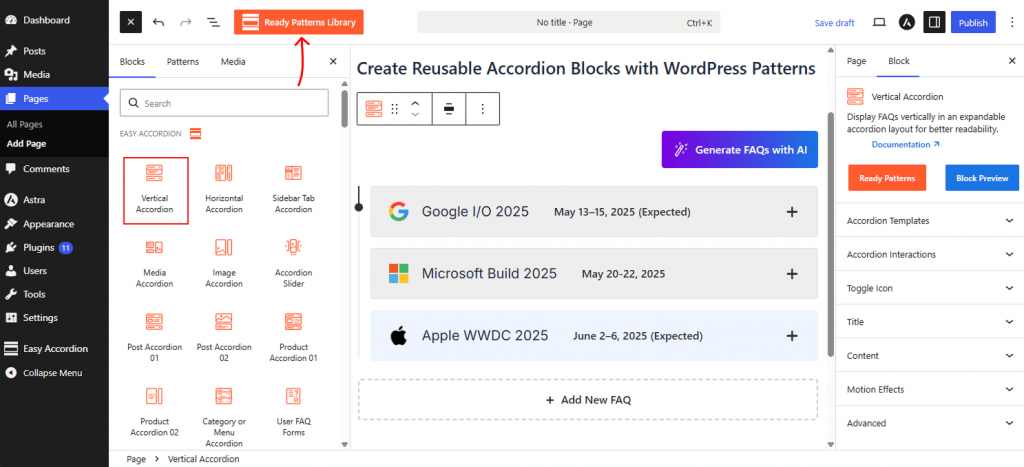
- From the WordPress Dashboard, open the page or post you want to create an Accordion Section.
- Click the (+) Block Inserter. Find the Easy Accordion blocks collection.
- Search for an Easy Accordion block, such as Horizontal, Image, or Post Accordion, as you need.
- Add your accordion items and customize the layout, styling, icons, colors, and behavior.
Once your accordion looks the way you want, you’re ready to save it as a reusable pattern.
Step 2: Save the Accordion Section as a WordPress Pattern
To save your completed accordion layout to the WordPress Pattern Library, follow the steps below:
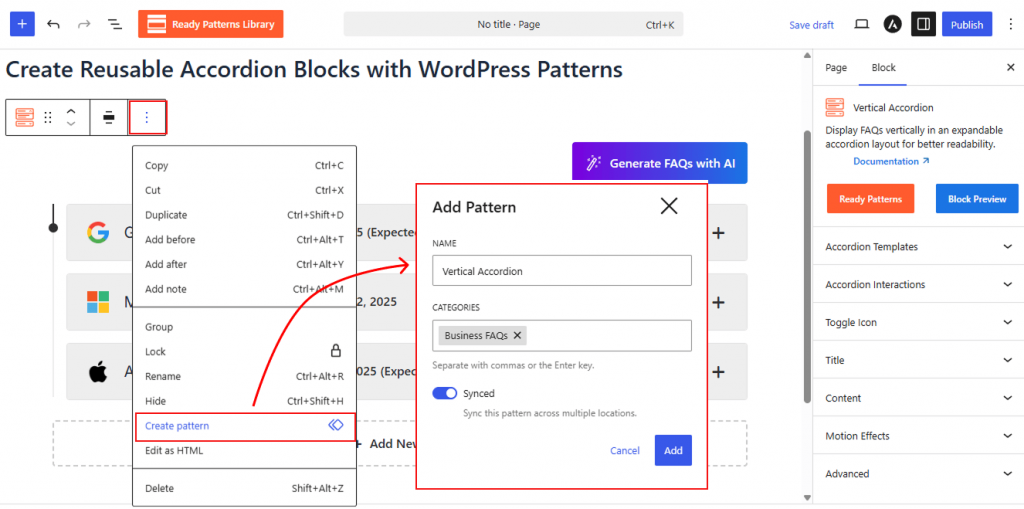
- Select your created Accordion Section. For example: Post Accordion
- Open the block Options (⋮) menu.
- Click Create Pattern.
In the pattern settings:
- Name: Enter a descriptive name for the pattern.
- Category: Choose an existing category to keep patterns organized.
- Synced: Enable if you want changes to update everywhere the pattern is used. Disable if each instance should be editable independently.
- Click Add to save the pattern.
Step 3: Reuse Accordion Blocks as Pattern Anywhere
Once created, you can reuse the accordion pattern anywhere on your website.
- Open the page or post where you want to use the saved patterns.
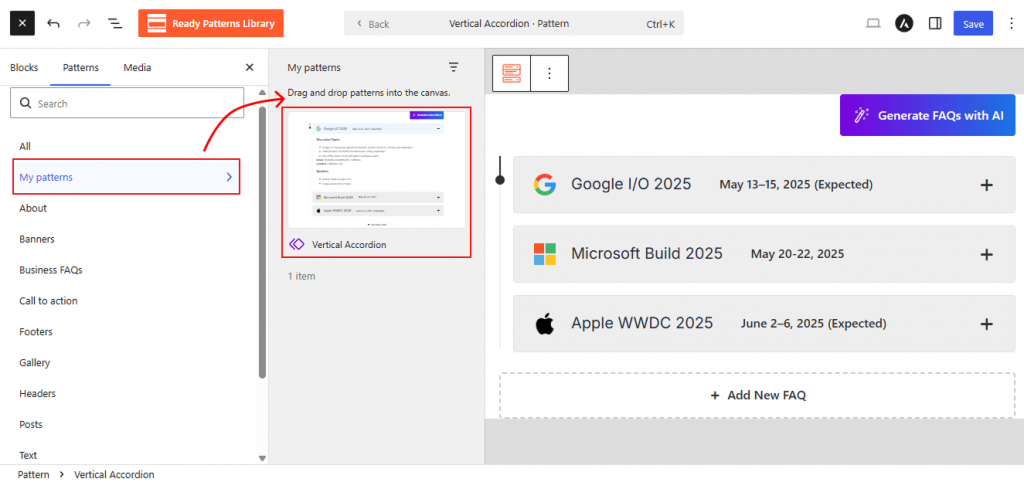
- Click the (+) Block Inserter and switch to the Patterns tab.
- Open My Patterns.
- Select your saved accordion pattern and insert it into the editor.
- Edit, Duplicate it as you want & Save.
That’s it.
Your complete accordion layout is now ready to use anywhere on your site, allowing you to add consistent FAQ sections, help documentation, product details, or knowledge base content without recreating the accordion from scratch.