

The Advanced Controls section allows you to fine-tune the plugin’s performance, script loading behavior, and custom styling to ensure seamless integration with your theme and other plugins.
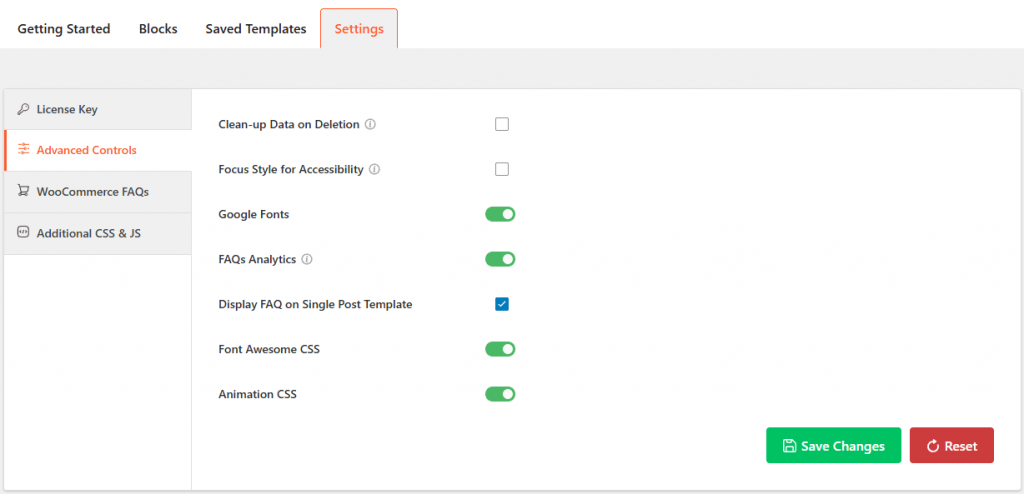
- Clean-up Data on Deletion: Enabling this will permanently remove all plugin data and settings from your database when the plugin is deleted.
- Focus Style for Accessibility: Toggle this to enable or disable the visual focus indicators (outlines) that help users navigate the accordion using a keyboard.
- Google Fonts: Enable this to control whether Google Fonts are enqueued. Disable this if you prefer to use your theme’s default fonts or wish to reduce external API requests.
- FAQs Analytics: Enable this to track user interactions and engagement metrics for your FAQ items.
- Display FAQ on Single Post Template: When checked, this allows FAQs to be automatically appended or displayed within your site’s single post templates.
- Font Awesome CSS: Use this toggle to load the Font Awesome library. Disable this if your theme or another plugin already provides Font Awesome to avoid script duplication.
- Animation CSS: It lets you have the necessary styles for smooth transition effects. Turn this off if you want to disable animations for a static display.