

The Manage Active Sites section allows you to activate, Deactivate, or transfer a license. From your ShapedPlugin account, you can view all activated sites and deactivate a license from any domain as needed.
Important: If you are transferring a license from a subdomain to a live domain, deactivate the license on the subdomain first. Otherwise, you may see the error:
“Your License key has reached its activation limit.”
After installing a plugin, you can activate the license key from your WordPress Dashboard. For full instructions, refer to the License Activation Procedure.
Here’s how to deactivate your license:
You can deactivate your license in two ways:
- From WordPress Dashboard
- From ShapedPlugin Account
Deactivate License from WordPress Dashboard:
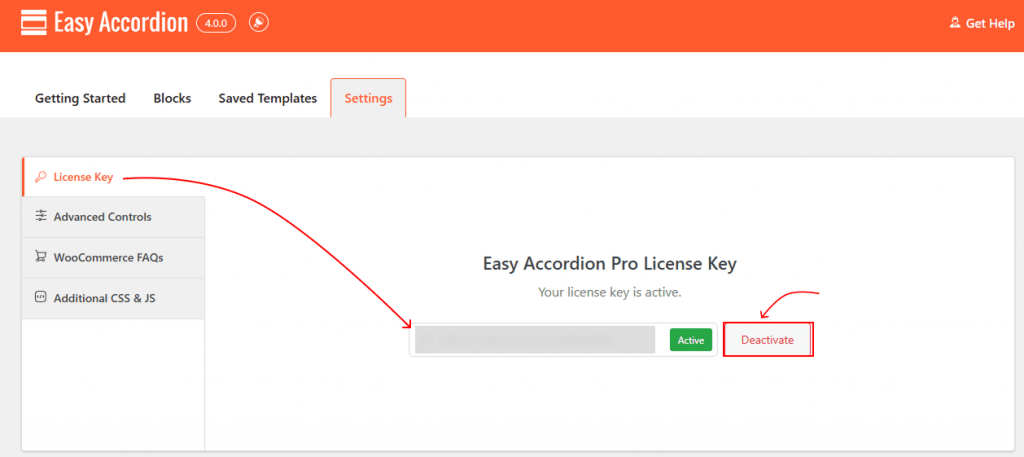
- Log in to the site where you want to deactivate the license.
- Navigate to Easy Accordion → Settings → License Key.
- Click Deactivate.
Great, your License deactivation is complete.
Deactivate License from Your ShapedPlugin Account:
If you’ve lost access to a site or forgotten the domain where the license was activated:
- Log in to your ShapedPlugin Account.
- Click Manage Sites to view all domains where the license is active.
- Click Deactivate Site next to the domain you want to remove.
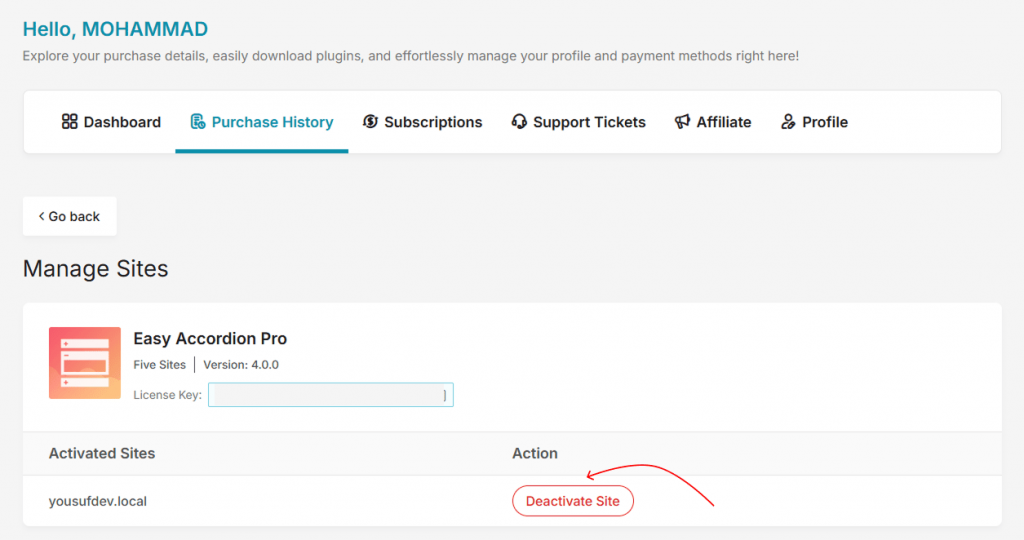
Once deactivated, the license key can be transferred and activated on another site.