

Let your user submit FAQ Forms instantly without a page reload, improving experience and increasing completion rates. By enabling the AJAX form submission, you can ensure a seamless interaction by providing immediate feedback, making the submission process feel faster and more modern.
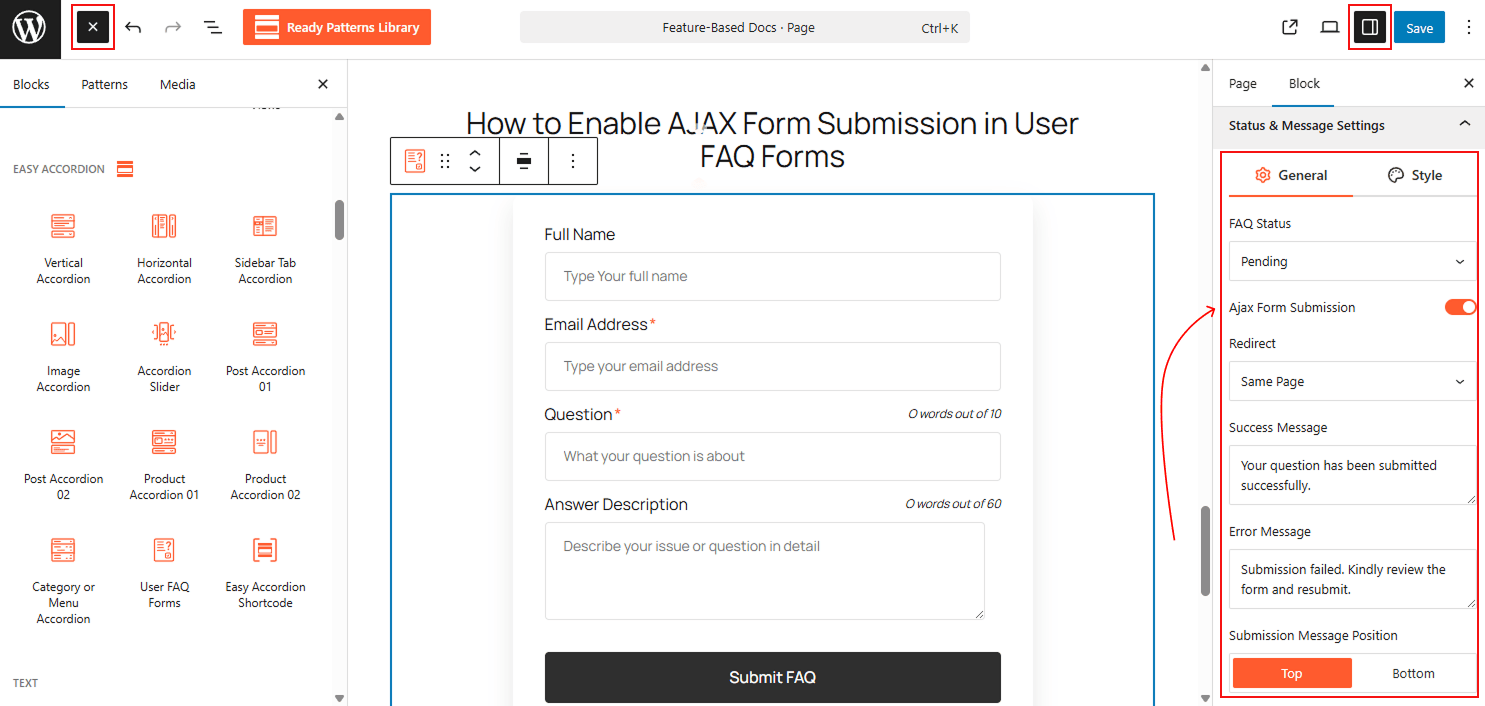
To Enable AJAX Form Submission:
- Insert any Accordion Blocks (e.g., “User FAQ Forms“) block to your page.
- Navigate to the Status & Message Settings tab in the block sidebar.
- Locate the Ajax Form Submission toggle and switch it to ON.
- Customize your Success Message and Error Message in the fields below to provide clear feedback to the user after they click submit.
To know how to configure, please visit the detailed documentation.
Let’s watch the Live Demo of how the AJAX Submission works in User FAQ Forms.