

Apply smooth animations to accordion content, creating dynamic interactions and improving user engagement. Adding Visual Effects to the Accordions, you can easily add a dynamic transition between collapsed and expanded states more fluid, giving your site a professional and polished feel.
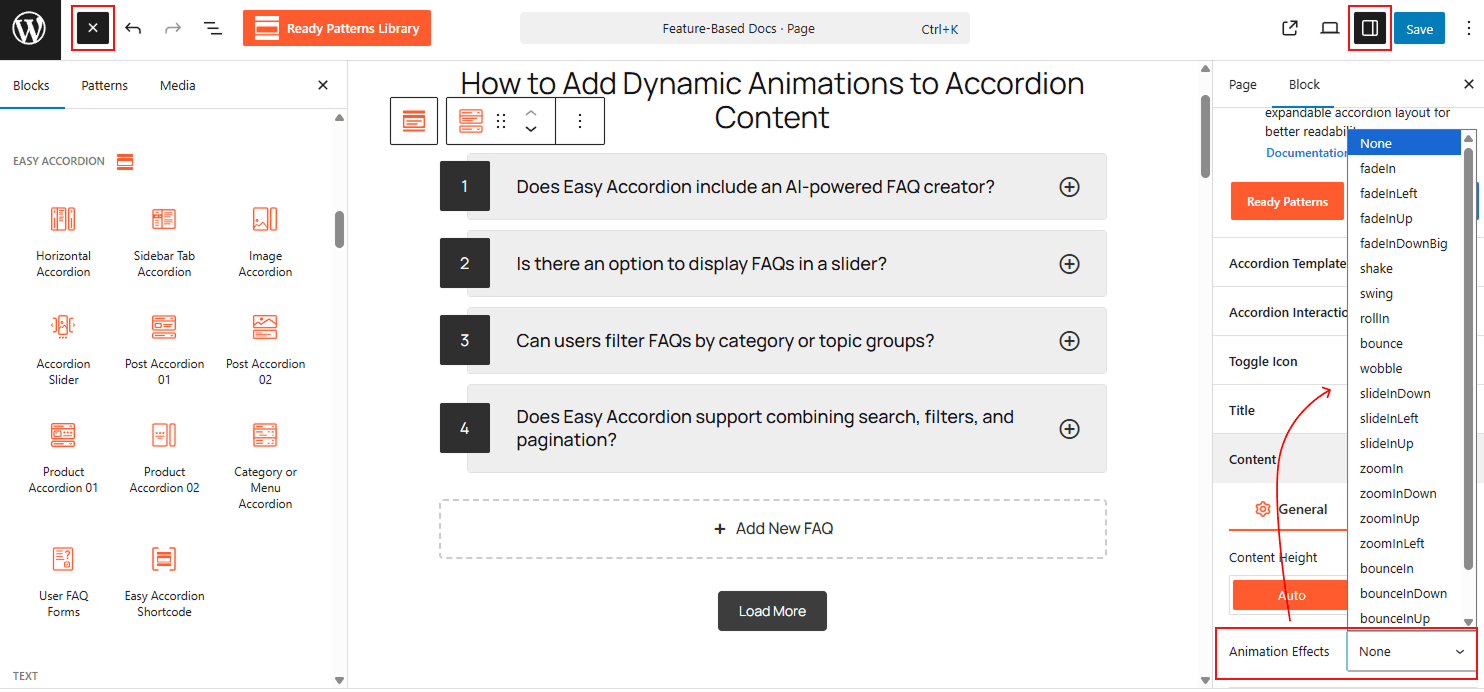
To Add Dynamic Animations to Accordion Content:
- Insert any Accordion Blocks (e.g., “Vertical Accordion“) block to your page.
- In the sidebar settings, open the Content tab and go to the General section.
- Locate the Animation Effects dropdown menu at the bottom.
- Select your preferred style, such as fadeIn, slideInDown, or zoomIn, to apply the effect to your content.
To know how to configure, please visit the detailed documentation.
Let’s watch the Live Demo of how the Animation Effects will look on your accordions.