

Since Easy Accordion includes an AI-Powered FAQs Generator, you must need to integrate your API key before generating FAQs to ensure it works correctly. This enables automated FAQ creation directly within your WordPress dashboard, allowing you to generate unlimited, well-structured FAQs with minimal manual effort.
Let’s watch the Video Tutorial to see how it works.
How to Enable Google Gemini API Integration:
Before configuring the Gemini AI, you must activate the integration:
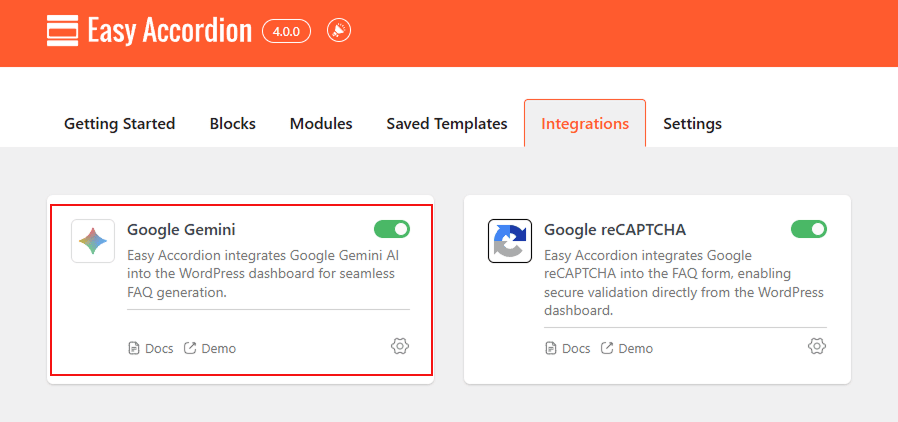
- Navigate to Easy Accordion > Modules> Integrations.
- Locate the Google Gemini card and toggle the switch to ON.
- Click the Settings on the card to open the configuration modal.
How to Configure Google Gemini AI API Key:
In the configuration modal, you’re requested to set up your credentials to link the plugin with Google’s AI services:
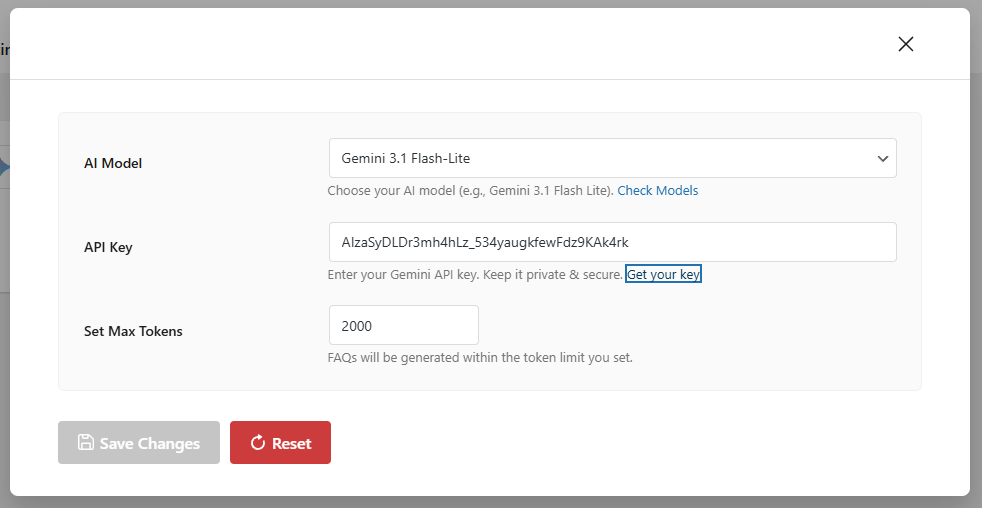
- AI Model: Choose your preferred model (e.g., Gemini 3.1 Flash-Lite) from the dropdown menu to balance speed and depth.
- API Key: Enter your unique Gemini API Key. You can obtain a key by clicking the “Get Your API Key“.
- Set Max Tokens: Define a token limit (e.g., 2000) to control the length and complexity of the generated FAQs.
- Save Changes: Click Save Changes to finalize the integration.